So you want to start streaming? Whether you’re dreaming of becoming the next Kai Cenat or just want to share your gaming sessions with friends, having the right setup makes all the difference. In 2025, the barrier to entry has never been lower — you can start for under $200 or go full professional for $2,000+. This guide covers everything, from budget beginner setups to the full pro rig used by top streamers.
The Most Important Rule: Audio First
Before anything else, understand this: viewers will tolerate bad video, but they will NOT tolerate bad audio. If your microphone sounds like you’re streaming from inside a tin can, people will leave within seconds. Invest in a good mic before anything else.
🎤 Microphones: From Budget to Pro
Budget Pick: FIFINE USB Microphone (~$30-$50)
If you’re just starting out and don’t want to spend a lot, the FIFINE USB microphone series punches well above its price point. Plug-and-play USB, cardioid polar pattern, and surprisingly clean audio for the price.
👉 Shop FIFINE USB Microphones on Amazon
Mid-Range Pick: Blue Yeti USB Mic (~$100-$130)
The Blue Yeti is the most popular streaming microphone in the world for a reason. Multiple polar patterns, USB plug-and-play, built-in headphone monitoring, and excellent audio quality. It’s the gold standard for streamers who want to sound professional without going full broadcast.
👉 Shop the Blue Yeti on Amazon
Pro Pick: Shure SM7B + Audio Interface (~$400 combo)
The Shure SM7B is the microphone used by Joe Rogan, most major podcasters, and many top streamers. It’s an XLR dynamic microphone that requires an audio interface (like the Focusrite Scarlett Solo), but the audio quality is broadcast-level. If you’re serious about streaming long-term, this is the setup to aspire to.
👉 Shop the Shure SM7B on Amazon
👉 Shop the Focusrite Scarlett Solo on Amazon
📷 Webcams: Look Your Best on Camera
Budget: Logitech C920 (~$70)
The Logitech C920 has been the streaming webcam standard for over a decade. 1080p at 30fps, solid autofocus, and reliable color reproduction. It just works.
👉 Shop the Logitech C920 on Amazon
Mid-Range: Logitech C922 Pro or Elgato Facecam (~$100-$150)
The C922 adds 720p60fps for smoother video, while the Elgato Facecam offers a Sony sensor with exceptional low-light performance and no compression — perfect for streamers who want a cleaner image.
👉 Shop the Elgato Facecam on Amazon
Pro: Sony ZV-E10 as a Streaming Camera (~$600-$750)
Many top streamers use mirrorless cameras with capture cards instead of webcams. The Sony ZV-E10 is a popular choice — APS-C sensor, interchangeable lenses, and it connects via USB as a webcam or through an Elgato Cam Link 4K for the cleanest possible image.
👉 Shop the Sony ZV-E10 on Amazon
👉 Shop the Elgato Cam Link 4K on Amazon
💡 Lighting: The Secret Weapon
Good lighting transforms average webcam footage into professional-looking video. The difference is night and day.
- Ring Light: Simple, effective, and affordable. Place it behind your monitor for even face lighting. Shop Ring Lights on Amazon
- Key Light: Elgato Key Light or Key Light Air. App-controlled, adjustable color temperature, designed specifically for streamers. Shop Elgato Key Lights on Amazon
- RGB Bias Lighting: Govee or Philips Hue behind your monitor for that iconic streamer background glow. Shop RGB Bias Lighting on Amazon
🖥️ Capture Cards: Stream Console Games
If you’re streaming from a PS5, Xbox Series X, or Nintendo Switch, you’ll need a capture card to route the video to your PC for OBS or Streamlabs.
- Elgato HD60 X: The most popular capture card. 4K30 or 1080p60 HDR passthrough, USB 3.0. Shop on Amazon
- AVerMedia Live Gamer 4K: For those who want 4K60 HDR capture. PCIe internal card for zero latency. Shop on Amazon
🎮 Stream Decks: Level Up Your Production
The Elgato Stream Deck is a game-changer for streamers. It’s a customizable LCD button pad that lets you switch scenes, trigger alerts, control audio, post to social media, and more — all with one button press. Once you use one, you’ll wonder how you ever streamed without it.
👉 Shop the Elgato Stream Deck on Amazon
💺 The Gaming Chair & Desk Setup
You’re going to be sitting for hours. A proper ergonomic setup isn’t optional — it’s essential for your health and your stream quality.
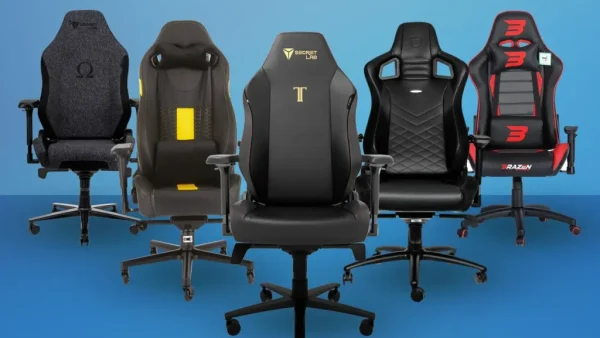
- Gaming Chair: Secretlab Titan or Herman Miller Aeron for long sessions. Shop Gaming Chairs on Amazon
- Adjustable Desk: A sit-stand desk lets you stream comfortably for hours. Shop Adjustable Desks on Amazon
- Monitor Arm: Free up desk space and position your monitor perfectly. Shop Monitor Arms on Amazon
The Complete Budget Starter Kit (~$200)
- FIFINE USB Mic — ~$40
- Logitech C920 Webcam — ~$70
- Ring Light — ~$25
- Elgato HD60 X Capture Card — ~$150 (if streaming console)
- OBS Studio — FREE
That’s all you need to go live and start building your audience. Everything else is an upgrade you can make over time as your channel grows.
Final Thoughts
The best streaming setup is the one you actually use. Don’t wait until you have the “perfect” gear — start now with what you have, upgrade as you grow, and focus on being entertaining and consistent. The tech matters, but you are what keeps people coming back.
Need help choosing specific gear for your budget? Drop a comment below and the Gamer Couch community will help you out!
Disclosure: This post contains Amazon affiliate links. If you purchase through our links, we may earn a small commission at no extra cost to you. Thanks for supporting The Gamer Couch Podcast! 🎮


Leave a Reply
You must be logged in to post a comment.