
There’s something deeply satisfying about a perfectly built gaming setup. The right chair, the right monitors, the right peripherals — all working together to create an environment where you can game for hours in comfort and style. Whether you’re starting from scratch or upgrading piece by piece, this is your complete guide to building the ultimate gaming battlestation in 2025.
Step 1: The Foundation — Your Gaming Desk
Everything starts with the desk. You need enough surface area for your monitors, peripherals, and accessories without feeling cramped. In 2025, L-shaped desks and sit-stand desks are the most popular choices among serious gamers.
🛠️ Best Gaming Desk: Flexispot or Uplift Standing Desk
A sit-stand desk is one of the best investments you can make for your health and productivity. Switching between sitting and standing during long gaming sessions reduces back pain, improves circulation, and keeps your energy levels up. The Flexispot E7 is a top-rated option with a sturdy dual-motor frame.
👉 Shop Electric Standing Desks on Amazon →
Prefer a traditional desk? An L-shaped gaming desk gives you maximum surface area for a multi-monitor setup plus space for streaming gear.
👉 Shop L-Shaped Gaming Desks on Amazon →
Step 2: The Throne — Your Gaming Chair
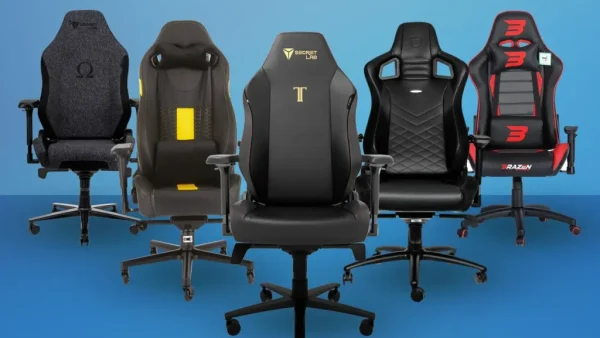
A good gaming chair isn’t just about aesthetics — it’s about protecting your back, neck, and posture during long sessions. The wrong chair will wreck you over time. Here are the best options at different price points:
🪑 Budget Pick: Homall or Devoko Gaming Chair
If you’re on a tight budget, a basic racing-style gaming chair from Homall or Devoko offers decent lumbar support and comfort for under $150. Not perfect, but miles better than a regular office chair.
👉 Shop Budget Gaming Chairs on Amazon →
🪑 Mid-Range Pick: Secretlab Titan or Corsair TC100
The Secretlab Titan is widely considered the best gaming chair in the $400–$500 range. It features a magnetic memory foam head pillow, integrated lumbar support, and a reclining backrest. It’s built to last years.
👉 Shop Secretlab Titan on Amazon →
🪑 Pro Pick: Herman Miller x Logitech Embody
If you want the absolute best and price is no object, the Herman Miller x Logitech Embody gaming chair is the gold standard. Designed with input from esports professionals and ergonomic experts, it’s the chair that will genuinely change how you feel after a 6-hour gaming session.
👉 Shop Herman Miller Embody on Amazon →
Step 3: The View — Gaming Monitors
Your monitor is where all the action happens. In 2025, 1440p at 165Hz+ is the sweet spot for PC gaming, while 4K monitors are becoming increasingly accessible.
📺 Best 1440p Gaming Monitor: LG 27GP850-B or ASUS ROG Swift
The LG 27GP850-B (27″, 1440p, 165Hz, IPS) hits the perfect balance of resolution, refresh rate, and color accuracy. It’s a favorite among both competitive gamers and content creators.
👉 Shop 1440p 165Hz Gaming Monitors on Amazon →
📺 Ultrawide Option: LG 34″ Ultrawide Curved
An ultrawide curved monitor transforms your gaming experience, wrapping the action around your field of view. The LG 34″ ultrawide series is a perennial favorite for immersive gaming and multitasking.
👉 Shop LG Ultrawide Monitors on Amazon →
Step 4: The Tools — Keyboard, Mouse & Headset
⌨️ Mechanical Gaming Keyboard: Logitech G915 or SteelSeries Apex Pro
A mechanical keyboard with satisfying tactile feedback makes gaming and typing a genuinely better experience. The Logitech G915 TKL is ultra-slim with wireless connectivity, while the SteelSeries Apex Pro features adjustable actuation switches.
👉 Shop Logitech G915 TKL on Amazon →
🐭 Gaming Mouse: Logitech G Pro X Superlight 2 or Razer DeathAdder V3
The Logitech G Pro X Superlight 2 is the mouse used by more professional esports players than any other. Incredibly light, precise, and wireless. The Razer DeathAdder V3 is an excellent ergonomic alternative.
👉 Shop Logitech G Pro X Superlight 2 on Amazon →
🎧 Gaming Headset: SteelSeries Arctis Nova Pro or Sony Inzone H9
The SteelSeries Arctis Nova Pro Wireless is arguably the best gaming headset money can buy in 2025. It features active noise cancellation, a hot-swap battery system, and exceptional audio quality for both gaming and music.
👉 Shop SteelSeries Arctis Nova Pro on Amazon →
Step 5: The Vibes — RGB Lighting & Accessories
🌈 Govee RGB LED Light Strips
RGB backlighting behind your monitor and around your desk reduces eye strain and creates the iconic gaming room aesthetic. Govee’s LED strips are app-controlled, music-reactive, and incredibly affordable.
👉 Shop Govee RGB Light Strips on Amazon →
🎤 Headset Stand with USB Hub
Keep your desk organized and your headset within reach with a headset stand that doubles as a USB hub. It’s a small upgrade that makes a big difference in desk cleanliness.
👉 Shop Headset Stands with USB Hub on Amazon →
Final Thoughts
Building your dream battlestation is a journey, not a destination. Start with the pieces that matter most to your gaming experience, and upgrade over time. A great chair and monitor will have the most immediate impact on your comfort and performance. From there, layer in the peripherals, lighting, and accessories that reflect your personality and playstyle.
Your setup should be a place you want to be. Make it yours.
Share your battlestation in the comments! We’d love to see your setup.
This post contains Amazon affiliate links. As an Amazon Associate, The Gamer Couch Podcast earns from qualifying purchases at no extra cost to you.


Leave a Reply
You must be logged in to post a comment.