
Desk setups get all the glory, but there’s something uniquely satisfying about a perfectly dialed-in couch gaming setup. Big screen, great sound, comfortable seating, and zero back pain after a five-hour session — that’s the dream. Whether you’re building from scratch or upgrading your existing living room setup, this guide covers everything you need to create the ultimate couch gaming experience in 2025.
Step 1: The Display — Go Big or Go Home
Your TV is the centerpiece of any couch gaming setup. In 2025, the sweet spot for couch gaming is a 65-inch OLED TV with 4K resolution, 120Hz refresh rate, HDMI 2.1, and low input lag. Here’s what to look for:
- Panel type: OLED for the best contrast and blacks; QLED for brightness in well-lit rooms
- Refresh rate: 120Hz minimum for PS5/Xbox Series X gaming
- HDMI 2.1: Required for 4K/120fps gaming
- Input lag: Look for under 10ms in Game Mode
- VRR support: Variable Refresh Rate (G-Sync/FreeSync) eliminates screen tearing
- Size: For typical couch-to-TV distances (8-12 feet), 65″ is the sweet spot
Top picks: LG C4 OLED, Samsung S90D OLED, Sony Bravia 9
👉 Shop 65″ 4K OLED Gaming TVs on Amazon
Step 2: The Seating — Comfort Is King
You could have the best TV and console in the world, but if your couch is uncomfortable, your gaming sessions will be cut short. Here’s what to look for in couch gaming seating:
- Reclining functionality for those long sessions
- Deep seat depth so you can sit back without sliding forward
- Firm but cushioned armrests for controller support
- Sectional or L-shaped for multiplayer setups
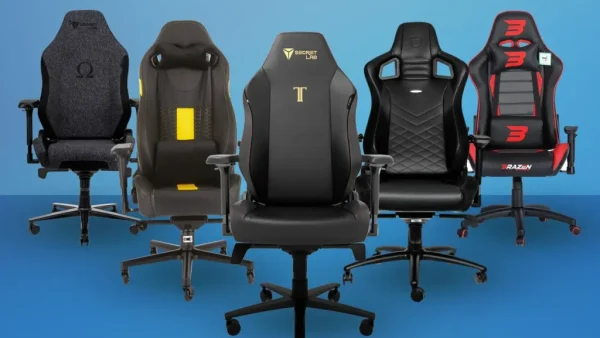
For the ultimate upgrade, consider a gaming recliner or a gaming sofa specifically designed for long play sessions.
👉 Browse Gaming Recliners and Sofas on Amazon
Step 3: Audio — Soundbar or Surround Sound?
Great audio is what separates a good gaming setup from an immersive one. For couch gaming, you have two main options:
Option A: Gaming Soundbar
A quality soundbar with a subwoofer is the easiest way to dramatically upgrade your TV’s audio. Look for Dolby Atmos support and a dedicated gaming mode. The Samsung HW-Q990D and Sony HT-A7000 are top-tier options in 2025.
👉 Shop Gaming Soundbars on Amazon
Option B: 5.1 or 7.1 Surround Sound System
If you want the full cinematic experience, a proper surround sound system with a receiver and satellite speakers will blow any soundbar out of the water. It’s more setup work, but the result is incredible.
👉 Find 5.1 Surround Sound Systems on Amazon
Step 4: Ambient Lighting — Set the Mood
Bias lighting (LED strips behind your TV) reduces eye strain during long sessions and makes your setup look incredible. In 2025, the best option is a Govee or Philips Hue TV backlight kit with a camera that syncs the colors to whatever’s on screen in real time.
👉 Shop TV Backlight Kits on Amazon
For the room itself, smart bulbs and LED strips along shelves and walls create a gaming atmosphere that looks straight out of a setup tour video.
👉 Browse Philips Hue Smart Lighting on Amazon
Step 5: Cable Management — Keep It Clean
Nothing ruins a beautiful setup like a rat’s nest of cables. Invest in cable management solutions: cable raceways, velcro ties, and a cable management box for your power strip and excess cables. A clean setup is a happy setup.
👉 Shop Cable Management Kits on Amazon
Step 6: Gaming Accessories for the Couch
📱 Controller Charging Station
Never hunt for a charging cable again. A dual controller charging dock keeps both your controllers powered up and displayed neatly on your entertainment unit.
👉 PS5 Controller Charging Station on Amazon | Xbox Charging Station on Amazon
🛋️ Lap Desk / Gaming Lap Tray
A good lap desk lets you rest your controller comfortably, hold snacks, or even use a keyboard and mouse from the couch. Look for ones with built-in storage and non-slip surfaces.
👉 Shop Gaming Lap Desks on Amazon
🔊 Wireless Gaming Headset
For late-night sessions when you don’t want to wake anyone up, a wireless headset is essential. Check out our full headset guide for top picks, or grab one below:
👉 Browse Wireless Gaming Headsets on Amazon
The Full Couch Gaming Setup Checklist
- ✅ 65″+ 4K OLED TV with 120Hz and HDMI 2.1
- ✅ Comfortable gaming recliner or deep-seat sofa
- ✅ Soundbar with Dolby Atmos or 5.1 surround sound
- ✅ TV backlight sync kit (Govee or Philips Hue)
- ✅ Smart ambient lighting for the room
- ✅ Clean cable management
- ✅ Dual controller charging station
- ✅ Gaming lap desk
- ✅ Wireless gaming headset
- ✅ Expanded console storage (SSD or expansion card)
Build this setup and you’ll have a living room that your friends will be jealous of — and gaming sessions you’ll never want to end. Share your own setup photos in the comments, and don’t forget to tune in to The Gamer Couch Podcast for more setup inspiration and gaming content!
Disclosure: This article contains Amazon affiliate links. If you purchase through these links, we may earn a small commission at no extra cost to you. Thank you for supporting The Gamer Couch Podcast!


Leave a Reply
You must be logged in to post a comment.